Part 2 Apache Beam คืออะไร เกี่ยวอะไรกับ Cloud Dataflow กันนะ
GCP Cloud Dataflow | Part 1 | The introduction ไปตามอ่านกันได้ที่ https://medium.com/@puk.kriangsak/gcp-cloud-dataflow-part-1-the-introduction-fef5863760a4

Intro
เกริ่นก่อนว่าในพาร์ทที่ 1 เราได้เล่าไปแล้วว่า Cloud dataflow (หลังจากนี้จะขอเขียนชื่อสั้นๆเหลือ Dataflow) คืออะไรแล้วใช้งานเบื้องต้นยังไงลิ้งอยู่ใต้ title และอย่างที่ทราบว่า Dataflow นั้นเป็นบริการที่อยู่ใน Google cloud platform ที่ทำได้ทั้ง Batch และ Streaming
แต่ทีนี้เมื่อเราอยากใช้งาน pipeline แต่ template ที่ Dataflow มีให้ก็ไม่ตรงกับงานที่เราอยากทำเช่น อยากดึง data จาก Kafka ไปที่ Pub/Sub หรืออยากทำ streaming machine learning pipeline prediction หรือ ขั้นตอน ETL เรามีความซับซ้อนมากๆซึ่งทางGCPไม่มีให้เลือกใช้
ดังนั้นเรามีความจำเป็นจะต้องมาเขียน template ไว้ใช้เองเป็น custom template แต่แล้วอย่างที่รู้ว่า Dataflow นั้นขับเคลื่อนด้วย Apache Beam ทำให้เราต้องมาทำความเข้าใจด้วยว่า Apache Beam คืออะไร ทีนี้มาเข้าเรื่องเลยดีกว่า Let’s go!!!🚀🚀🚀🚀
บทความนี้จะเขียนอยู่ในภาษา Python เป็นหลักแนะนำผู้อ่านควรรู้พื้นฐาน Python !!
และผู้อ่านไม่จำเป็นจะต้องใช้งาน Apache Beam บน Dataflow เสมอไป
Table of contents!
- Apache Beam คืออะไร ทำงานยังไง
- เขียน Dataflow flex template ด้วย Apache Beam ด้วยภาษา python
- Apache Beam VS. Apache Spark
1. Apache Beam คืออะไร ทำงานยังไง
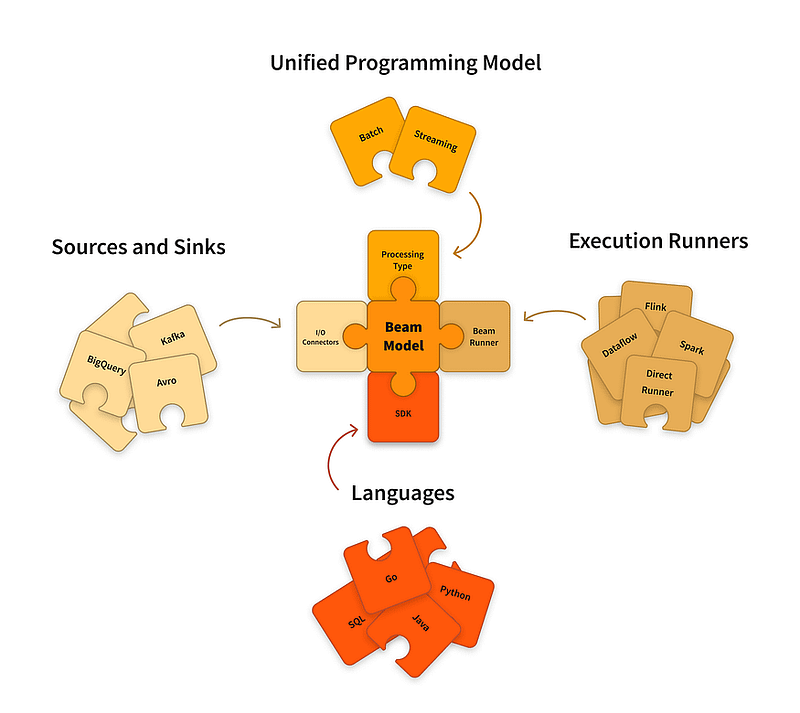
Apache Beam (จากนี้จะเรียกว่า Beam) นั้นถูกค้นพบเมื่อปี 2016 โดยทีม Google และ Contributors จุดประสงค์หลักเลยที่ได้คิดค้น Beam ขึ้นมานั้นก็เพื่อที่จะได้มีอิสระเสรีในการเลือกว่าจะทำ Data processing แบบไหนไม่ว่าจะเป็น Streaming/Batch หรือจะใช้ภาษา Programming อะไรก็ได้ Go, Python, Java, SQL และทำงานอยู่ในรูปแบบ Distributed programming ที่สามารถทำงานบน engine ได้หลากหลายเช่น GCP Dataflow, Apache Spark, Apache Flink, Direct runner
ก่อนจะไปดูว่า Beam ทำงานยังไงมาดูคำศัพท์เฉพาะตัวของ Beam กันก่อนดีกว่า เอามาเฉพาะบางส่วนที่สำคัญและควรทำความเข้าใจนะครับ ส่วนอื่นๆอาจจะต้องไปดูที่ Document เพิ่มนะครับ📖✏️
- Pipeline = ใน Beam นั้น Pipeline คือกราฟที่แสดงขั้นตอนการประมวลผลต่างๆตั้งแต่เริ่มจนจบ จะเรียกได้ว่าเป็นกราฟที่ลักษณะเป็น DAG (directed acyclic graph) อีกอย่างในขั้นตอนเขียนจะมีการใช้ตัว “|” หรือจะเรียกว่า Pipe ทำหน้าที่เหมือนเป็นท่อส่งไปเรื่อยๆด้วย
- PCollection = เป็น Dataset ที่ทำงานบน Beam โดยจะมาจาก Data ที่เรา ingest มาไม่ว่าจะเป็น bounded(Batch) หรือ unbounded(Streaming) ผมจะชอบจำว่าถ้าเรา ingest ข้อมูล 1 Dataframe ตัว PCollection ก็เท่ากับแต่ละ row ของ Dataframe หรือถ้าข้อมูลเราเป็นแบบ array ใน 1 PCollection ก็เท่ากับ 1 elements
- PTransform = เป็นขั้นตอน Process data ที่อยู่ใน Pipeline โดยจะเป็นการรับ Input ที่เป็น PCollection มา Process แล้วก็ส่งต่อไปอีกที ตัวอย่างของ PTransform ก็จะมี ParDo, GroupByKey, Combine เป็นต้น ก็จะมีตัวอย่างด้านล่างเพื่อทำความเข้าใจมากขึ้น ⬇️⬇️

4. ParDo = Parallel Do เป็น 1 ใน PTransform เป็นขั้นตอนที่มีการทำงานเป็นแบบ Parallel ภายใน PTransform และเพื่อใช้งานหรือไม่ใช้งาน UDF(User define function ฟังก์ชั่นใน Python นั้นแหละครับ👌) ParDo จะทำการ Process แต่ละ element ใน PCollection พร้อมๆกัน

5. DoFn = DoFn คือส่วนประกอบหลักของ ParDo โดยจะเป็น object ของ PCollection ที่จะเป็นตัวบอกว่า PCollection นั้นจะต้องทำอะไรบ้างใน PTransform นั้นๆ เปรียบเสมือนเป็นLogicชุดคำสั่ง เช่น
class PairWithIndexOne(beam.DoFn):
def process(self, element):
  return [(element[1], 1)]
with beam.Pipeline() as pipeline:
  text = pipeline | beam.ParDo(PairWithIndexOne())
                  | beam.Map(print)
## เมื่อ PCollection เดินทางมาถึง PTransform ที่เป็นด้านบนที่เป็น ParDo
## Dofn ก็จะกำกับว่า PCollection จะต้องไปเข้าสู่ฟังก์ชั่นที่เป็น PairWithIndexOne
## แล้วจะได้ PCollection output เป็น (element[1], 1) เพื่อส่งต่อบบรทัดต่อไปที่เป็น Map(print)
6. Map = Map เป็น 1 ใน PTransform เป็นขั้นตอนที่มีการทำงานเป็นแบบ Parallel ภายใน PTransform คล้ายๆการทำงานของ ParDo แต่เป็นการสั่งให้มีการทำงานเป็นตามลำดับ ก็จะทำงานเป็นตามลำดับ เหมาะสำหรับ Process ที่เรายังอยากจะคงลำดับของข้อมูลเอาไว้

จุดต่างที่สำคัญสำหรับ Map และ ParDo เลยก็คือ ถ้าอยากคงลำดับ element แนะนำเลือกไปที่ Map แต่ถ้าอยากได้การทำงานของ function พร้อมกันๆเช่น อยากนับจำนวนตัวอักษร
PCollection("hello", "world") -(ParDo)-> PCollection("h", "e", "l", "l", "o", "w", "o", "r", "l", "d")

PCollection("hello", "world") -(Map)-> PCollection(["h", "e", "l", "l", "o"], ["w", "o", "r", "l", "d"])
7. Sideinput = คือการเอา Input จากส่วนอื่นเข้ามาอยู่ใน Pipeline ของเรา อย่างการ Ingest ข้อมูลจาก CSV แต่มีคอลัมหนึ่งที่เราอยากจะเปลี่ยนให้เป็นค่าจาก Master data อย่างเช่น Column Gender = 1 ซึ่งใน Master Data เราจะมีบอกว่า 1=Male 2=Female เราก็เอามาเป็น SideInput ใน Pipeline เรานั้นเอง
8. Runner = Runner คือ Engine ที่เราอยากจะให้ Beam เราทำงานเช่น Dataflow Runner คือการให้ Beam Script เราไปทำงานที่ Cloud Dataflow หรือ DirectRunner คือการสั่งให้ Beam Script เราทำงานที่ local ของเรา
Learning by doing มาลองเขียน Apache Beam กัน🔥🚀
Beam จะมีลักษณะเด่นๆเลยคือสัญลักษณ์ “|” ที่เรียกว่า Pipe นั้นเองจะเป็นตัวบ่งบอกว่า PCollection จากไหนแล้วจะต้องไปไหนต่อ
ตัวอย่าง basic Beam colab python notebook: https://colab.research.google.com/github/apache/beam/blob/master/examples/notebooks/get-started/learn_beam_basics_by_doing.ipynb
มาทำความเข้าเรื่องการเขียน Pipeline เบื้องต้นโดยจะ Flow เบื้องต้นตามภาพ ⬇️
จะเทียบเท่ากับการเขียนแบบนี้⬇️
with beam.Pipeline() as pipeline:

  outputs = (pipeline | step1  #ถ้าเทียบตาม Flow คือ Read transform
                      | step2  #ถ้าเทียบตาม Flow คือ transform
                      | step3  #ถ้าเทียบตาม Flow คือ Write transform
             )
  ## or write in this way using \
  outputs = pipeline | step1  \  #ถ้าเทียบตาม Flow คือ Read transform
                     | step2  \  #ถ้าเทียบตาม Flow คือ transform
                     | step3     #ถ้าเทียบตาม Flow คือ Write transform

  ## or composite transform, a pre written transform เหมาะสำหรับการแยกขั้นตอน Ptransform ให้เป็นระเบียบ
def some_transform(pcol1):
  return (pcol1 | step3
                | step4
                | step5
          )

with beam.Pipeline() as pipeline:
  outputs = pipeline | step1  \  #ถ้าเทียบตาม Flow คือ Read transform
                     | step2  \  #ถ้าเทียบตาม Flow คือ transform
                     | some_transform() # Pcollection จะวิ่งไปทำงานที่ function some_transform
                     | step6     #ถ้าเทียบตาม Flow คือ Write transform
จะเห็นได้ว่าไม่ได้ยากมากนักใช่ไหมครับ จะมี “|” เป็นตัวบ่งบอกว่าจากไหนส่งไปไหนต่อแล้วมาดูกันว่าถ้าเขียนจริงเพื่อให้ได้ output ออกมาจะเป็นยังไง
#ก่อนเริ่มต้องทำการติดตั้ง Library ให้เรียบร้อย
pip install --quiet apache-beam
ตัวอย่างที่ 1 แปลง Python list ให้เป็น PCollection แล้ว Transform และ Print output ออกมาโดยใช้ Map PTransform

import apache_beam as beam
# ตัวอย่างชุดข้อมูลที่เป็นแบบ list
sample_list = [
          '   🍓Strawberry   \n',
          '   🥕Carrot   \n',
          '   🍆Eggplant   \n',
          '   🍅Tomato   \n',
          '   🥔Potato   \n',
        ]
with beam.Pipeline() as pipeline:
    plants = (
      pipeline
      | 'Gardening plants' >> beam.Create(sample_list) #สร้าง PCollection จาก sample_list
      | 'Strip' >> beam.Map(str.strip) #ทำการ Transform โดยใช้คำสั่ง strip เพื่อลบช่องว่างด้านหน้าและด้านหลังของคำศัพท์
      | 'Print output' >> beam.Map(print) #ทำการ Print output เผื่อแสดงข้อมูล
    )
#ชื่อที่อยู๋ใน '' ~ quote ที่อยู่ด้านหน้าของแต่ละ PTransform นั้นเป็นแค่การ label ขั้นตอนไม่ได้ส่งผลอะไรกับ Pipeline แต่ Label จะต้องไม่ซ้ำกัน
### output ###
🍓Strawberry
🥕Carrot
🍆Eggplant
🍅Tomato
🥔Potato
จะเห็นได้ว่ามีการตั้งค่า variable อยู่ในรูปแบบ list ชื่อว่า sample_list แล้วก็มีการสร้าง PCollection โดยคำสั่ง beam.Create หลังจากนั้นก็เข้าสู่ขั้นตอน PTransform beam.Map(str.strip) เป็นการลบช่องว่างด้านหน้าและหลังออก
ตัวอย่างที่ 2 แปลง Python Dictionary ให้เป็น PCollection แล้ว Transform และ Print output ออกมาโดยใช้ ParDo

import apache_beam as beam
orders = [
    {'product_id': 1, 'quantity': 2, 'price': 10},
    {'product_id': 2, 'quantity': 3, 'price': 15},
    {'product_id': 1, 'quantity': 1, 'price': 10},
    {'product_id': 3, 'quantity': 4, 'price': 8}
]

def calculate_revenue(order):
    """Calculates the total revenue for an order."""
    yield (order['product_id'], order['quantity'] * order['price'])

with beam.Pipeline() as p:
    # Create a PCollection from the list of dictionaries
    orders_pcollection = p | 'Create orders' >> beam.Create(orders)

    # Calculate the total revenue for each product using Pardo
    total_revenue = orders_pcollection | 'Calculate total revenue' >> beam.ParDo(calculate_revenue) \
                                       | 'Group by product' >> beam.GroupByKey() \
                                       | 'Sum revenue' >> beam.CombineValues(sum)

    # Print the results
    total_revenue | 'Print results' >> beam.Map(print)

#### ouput #####
(1, 30)
(2, 45)
(3, 32)
ในตัวอย่างอันนี้จะเป็นการเรียกงาน ParDo โดยเป็นการสมมุติว่าเรามียอดขายแล้วเราอยากจะทำการหาว่าแต่ละ product ขายได้เท่าไหร่ ก็เริ่มด้วยการสร้าง PCollection ด้วย beam.Create หลังจากนั้นก็เป็นการเข้า function ด้วย beam.ParDo(calculate_revenue) เพื่อหาว่าแต่ละ record นั้นยอดขายเท่าไหร่ และที่ทำไมตัว function ต้องใช้ yield ทำไมไม่ใช้ return ก็เพราะเราต้องการ output ทีละชุดเพื่อมาทำงานต่อที่ beam.Groupbykey อธิบายเพิ่มเติมด้านล่าง⬇️
## ในตัวอย่างนี้ทำไมเราถึงใช้ yield เพราะว่าจะเป็นการส่งต่อไปทันทีหลังจาก pcol มีการ process เสร็จ
yield output >> pcol1 = (1, 20) pcol2 = (2, 45) n....
## return นั้นจะเป็นการรอทำพร้อมกันและส่งออกไปพร้อมกันทีเดียวซึ่งในตัวอย่าง GroupByKey ต้อง pcol ที่เป็น tuple ไม่ได้ต้องการ List
return output >> pcol1pcol2pcoln... = [(1, 20),(2, 45),n...]

##แนะนำว่าส่วนใหญ่เน้นนะครับส่วนใหญ่ แต่ก็ไม่เสมอไป
##ถ้าเราใช้ ParDo ฟังชั่นที่เราใช้จะเป็น yield แต่ถ้าใช้ Map เรามักจะใช้ return
beam.Groupbykey ก็ตามชื่อเลยจับกลุ่มกันของ PCollection output ของ Groupbykey จะได้ (1, [20, 10]) (2, [45]) (3, [32]) เพราะ product_id : 1 จะมีสอง record ด้วยกัน หลังจาก Groupbykey เสร็จแล้วก็มา CombineValues ต่อก็ตามชื่อเหมือนกันจะเป็นการรวมกันของ value ในแต่ละ tuple สุดท้าย Output จะได้ตามรูป
(1, [20, 10]) (2, [45]) (3, [32]) -> (1, 30),(2, 45),(3, 32)
2. เขียน Dataflow flex template ด้วย Apache Beam ด้วยภาษา python
การสร้าง Dataflow template นั้น template จะมีด้วยสองแบบก็คือ 1. classic template 2. flex template ซึงทำไมเราต้องทำ template ก็เพราะ template ที่ GCP ให้มานั้นไม่ตอบโจทย์เราก็ต้องทำขึ้นมาเอง
Classic template จะเหมาะกับ pipeline ที่มีความเรียบง่ายตรงไปตรงมา
Flex template ตามชื่อเลยจะเหมาะกับ pipeline ที่มีความยุ่งยากมากกว่าและจะมีความ dynamic ได้มากกว่าเช่น source ของเรานั้นมีบางครั้งที่ data ที่เข้ามามีความเฉพาะเจาะจงที่ Pipeline เราจะทำงานแตกต่างไปจากปรกติ flex template ก็มาช่วยตรงนี้
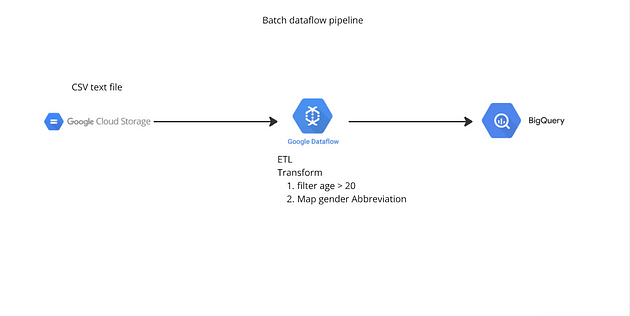
เริ่มจากการวางแผนเสมอ เราจะมาทำกันในรูปแบบง่ายๆเป็นรูปแบบ batch กันและอยู่ในรูปแบบ flex template
เราจะไม่ได้ใช้ Jupyter notebook แล้วเพราะงั้นเปิด code editor ที่คุณชอบได้เลยแล้วมาเริ่มจากสร้าง Python venv ให้พร้อมแล้วเริ่มกันเลย
มาเริ่มกันที่ติดตั้ง library เนื่องจากเรามีการใช้งาน plugin กับทาง GCP เพราะงั้นจึงต้องลง library ด้วย
pip install 'apache-beam[gcp]'
สร้าง Bucket ใน GCS เพื่อเอาไฟล์ไปวางให้เรียบร้อยเป็นอย่างแรกเป็น Source ที่เราจะทำ Pipeline

มาเริ่มเขียนกัน เริ่มจาก Import library ต่างๆ
import time
import argparse
import apache_beam as beam
from apache_beam.io.textio import WriteToText
from apache_beam.options.pipeline_options import PipelineOptions
from apache_beam.io.gcp.internal.clients import bigquery
สร้าง Function สำหรับการทำ Transform โดยเราจะทำแค่อย่างเดียวคือการ Transform เพศจากตัวเต็มเป็นตัวย่อ และอีกอย่างที่อยากเสริมจริงๆ Function ที่ทำนั้นค่อยเรียบง่ายไม่ได้จำเป็นต้องถึงขนาดว่าต้องใช้ ParDo หรือ Class DoFn ด้วยสามารถทำด้วย beam.Map และ Function ง่ายๆก็ได้ แต่ผมอยากให้ได้เห็นว่ารูปแบบ ParDo เป็นลักษณะอย่างไร
### functions and classes ###
class gender_abbv2(beam.DoFn):
    """DoFn class to convert gender full names to abbreviations."""

    def process(self, object):
        gender_full_name = {"FEMALE": "F", "MALE": "M"}
        # use upper() to handle case sensitive
        if (object.gender.upper() in gender_full_name):
            # since beam.DoFn taking input here as a tuple which is mutable we need to create new object which contain transform
            new_object = dict(object._asdict())
            new_object["gender"] = gender_full_name[object.gender.upper()]
            yield new_object
        else:
            new_object = dict(object._asdict())
            new_object["gender"] = "NA"
            yield new_object
มาที่พาร์ทเรียก Argument จาก Terminal เหตุที่ต้องใช้วิธีนี้เพราะเวลาจะเรียกใช้ผ่าน Dataflow console เราสามารถเพิ่ม Argument ได้ง่ายๆ หลักๆก็ Input, Output และ Runner สิ่งสำคัญคือ ถ้าอยากใช้ DataflowRunner เราจำเป็นต้องมี
region: the region for your Dataflow job.runner: the pipeline runner that executes your pipeline. For Google Cloud execution, this must beDataflowRunner.temp_location: a Cloud Storage path for Dataflow to stage temporary job files created during the execution of the pipeline.project: your Google Cloud project ID.
    # Parses the parameters provided on the command line and runs the pipeline.
    parser = argparse.ArgumentParser()
    parser.add_argument(
        "--input_gcs_path", required=True, help="Input GCS path for the CSV file"
    )
    parser.add_argument(
        "--output_bq_dataset", required=True, help="Output BigQuery dataset"
    )
    parser.add_argument(
        "--output_bq_table", required=True, help="Output BigQuery table"
    )
    parser.add_argument("--project", required=True, help="Google Cloud project ID")
    parser.add_argument("--location", default="us-central1", help="GCP location")
    parser.add_argument(
        "--job_name",
        default="{0}{1}".format("my-pipeline-", time.time_ns()),
        help="Job name special charecter accept only '-' hyphen",
    )
    parser.add_argument(
        "--temp_location",
        default="gs://your-bucket/temp",
        help="Temporary location for pipeline artifacts",
    )
    parser.add_argument(
        "--runner", default="DirectRunner", help="Beam runner default DirectRunner"
    )
    args, pipeline_args = parser.parse_known_args()
ส่วนของค่าตัวแปรต่างๆไม่ว่าจะเป็นชื่อ Bigquery table หรือ schema
    # pipeline option when you need to run it at Cloud Dataflow
    if args.runner == "DataflowRunner":
        beam_options = PipelineOptions(
            pipeline_args,
            runner="DataflowRunner",
            project=args.project,
            job_name=args.job_name,
            temp_location=args.temp_location,
            region=args.location,
        )
    else: # no DataflowRunner mean that we will use DirectRunner (local run)
        beam_options = None

    # table referece output will be Project:datasetid.tableid
    table_spec = bigquery.TableReference(
        projectId=args.project,
        datasetId=args.output_bq_dataset,
        tableId=args.output_bq_table,
    )

    # table schema can be either json, dict or string like in this example column_name:BIGQUERY_TYPE, ...
    table_schema = "id:STRING, first_name:STRING, last_name:STRING, email:STRING, gender:STRING, age:integer"
แล้วก็มาถึงส่วนสำคัญของเรา Pipeline นั้นเอง จะมีการตั้งค่า Pipeline อยู่ใน beam.Pipeline เพื่อบ่งบอกว่าเราจะทำการรันที่ Cloud Dataflow ผ่าน Arguments ที่ได้มาก่อนหน้านี้ ส่วนลำดับการทำงาน Pipeline ก็ตามที่เราได้ Label ไว้ ส่วน Plugin ทั้ง Input และ Output มีอะไรบ้างสามารถเช็คใน Official Document อยู่ด้านล่างบทความ
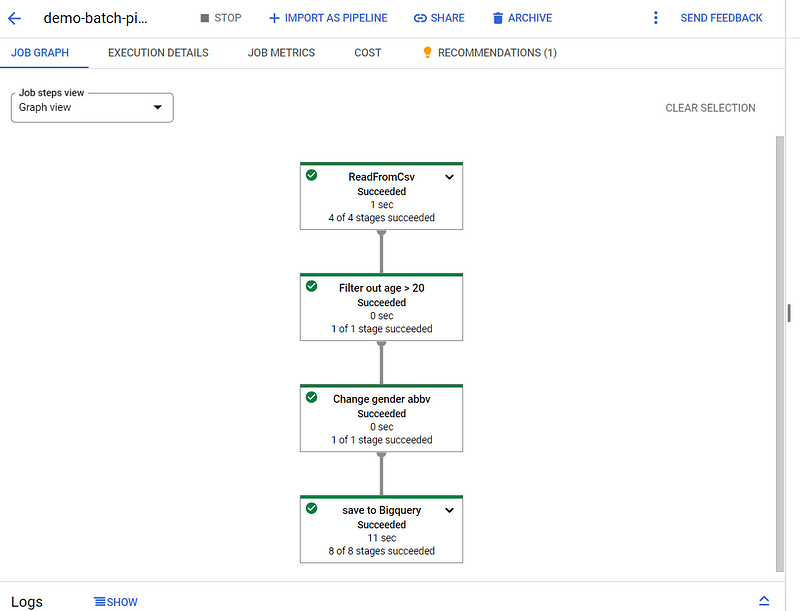
Ingest -> Filter -> Change gender abbv -> Save to Bigquery
    with beam.Pipeline(options=beam_options) as pipeline:
        result = (
            pipeline
            | "Read from CSV" >> beam.io.ReadFromCsv(args.input_gcs_path)
            | "Filter out age > 20" >> beam.Filter(lambda object: object.age > 20)
            | "Change gender abbv" >> beam.ParDo(gender_abbv2())
        )

        save_result = result | "save to Bigquery" >> beam.io.WriteToBigQuery(
            table=table_spec,
            schema=table_schema,
            custom_gcs_temp_location=args.temp_location,
            method="FILE_LOADS",
            write_disposition=beam.io.BigQueryDisposition.WRITE_TRUNCATE,
            create_disposition=beam.io.BigQueryDisposition.CREATE_IF_NEEDED,
        )
เมื่อเอาทั้งหมดมารวมกันก็จะได้ประมาณนี้ main.py
import time
import argparse
import apache_beam as beam
from apache_beam.options.pipeline_options import PipelineOptions
from apache_beam.io.gcp.internal.clients import bigquery

### functions and classes ###
class gender_abbv2(beam.DoFn):
    """DoFn class to convert gender full names to abbreviations."""

    def process(self, object):
        gender_full_name = {"FEMALE": "F", "MALE": "M"}
        if (
            object.gender.upper() in gender_full_name
        ):  # use upper() to handle case sensitive
            new_object = dict(
                object._asdict()
            )  # since beam.DoFn taking input here as a tuple which is mutable we need to create new object which contain transform
            new_object["gender"] = gender_full_name[object.gender.upper()]
            yield new_object
        else:
            new_object = dict(object._asdict())
            new_object["gender"] = "NA"
            yield new_object

### main ###
def run():
    # Parses the parameters provided on the command line and runs the pipeline.
    parser = argparse.ArgumentParser()
    parser.add_argument(
        "--input_gcs_path", required=True, help="Input GCS path for the CSV file"
    )
    parser.add_argument(
        "--output_bq_dataset", required=True, help="Output BigQuery dataset"
    )
    parser.add_argument(
        "--output_bq_table", required=True, help="Output BigQuery table"
    )
    parser.add_argument("--project", required=True, help="Google Cloud project ID")
    parser.add_argument("--location", default="us-central1", help="GCP location")
    parser.add_argument(
        "--job_name",
        default="{0}{1}".format("my-pipeline-", time.time_ns()),
        help="Job name special charecter accept only '-' hyphen",
    )
    parser.add_argument(
        "--temp_location",
        default="gs://yourbucket/temp",
        help="Temporary location for pipeline artifacts",
    )
    parser.add_argument(
        "--runner", default="DirectRunner", help="Beam runner default DirectRunner"
    )
    args, pipeline_args = parser.parse_known_args()

    # pipeline option when you need to run it at Cloud Dataflow
    if args.runner == "DataflowRunner":
        beam_options = PipelineOptions(
            pipeline_args,
            runner="DataflowRunner",
            project=args.project,
            job_name=args.job_name,
            temp_location=args.temp_location,
            region=args.location,
        )
    else:
        beam_options = None

    # table referece output will be Project:datasetid.tableid
    table_spec = bigquery.TableReference(
        projectId=args.project,
        datasetId=args.output_bq_dataset,
        tableId=args.output_bq_table,
    )

    # table schema can be either json, dict or string like in this example column_name:BIGQUERY_TYPE, ...
    table_schema = "id:STRING, first_name:STRING, last_name:STRING, email:STRING, gender:STRING, age:integer"

    with beam.Pipeline(options=beam_options) as pipeline:
        result = (
            pipeline
            | "Read from CSV" >> beam.io.ReadFromCsv(args.input_gcs_path)
            | "Filter out age > 20" >> beam.Filter(lambda object: object.age > 20)
            | "Change gender abbv" >> beam.ParDo(gender_abbv2())
        )

        save_result = result | "save to Bigquery" >> beam.io.WriteToBigQuery(
            table=table_spec,
            schema=table_schema,
            custom_gcs_temp_location=args.temp_location,
            method="FILE_LOADS",
            write_disposition=beam.io.BigQueryDisposition.WRITE_TRUNCATE,
            create_disposition=beam.io.BigQueryDisposition.CREATE_IF_NEEDED,
        )

if __name__ == "__main__":
    run()
มาเริ่มเทสกันโดยเริ่มจากเราสั่งให้ทำงานใน Local ก่อนจะได้ไม่ต้องไปเปลือง Cost บน GCP ถ้าเทสบน Local เราแล้วสามารถทำงานได้ เราก็ลองเรียก DataflowRunner ดู
# DirectRunner Default (local run)
python3 main.py --input_gcs_path=gs://yourbucket/MOCK_DATA_dataflow.csv \
--project=your_project_id\
--output_bq_dataset=your_project_id\
--output_bq_table=your_project_id\
--job_name=test-job

# DataflowRunner add --runner=DataflowRunner to run it at Cloud Dataflow
python3 main.py --input_gcs_path=gs://yourbucket/MOCK_DATA_dataflow.csv \
--project=your_project_id \
--output_bq_dataset=your_dataset_id \
--output_bq_table=your_table_id \
--job_name=test-job \
--location=us-central1 \
--runner=DataflowRunner

พอเราได้ script pipeline เราแล้วทีนี้ก็เหลือแต่การสร้าง Template โดยสิ่งที่ต้องมี
- Pipeline script
- Metadata.json
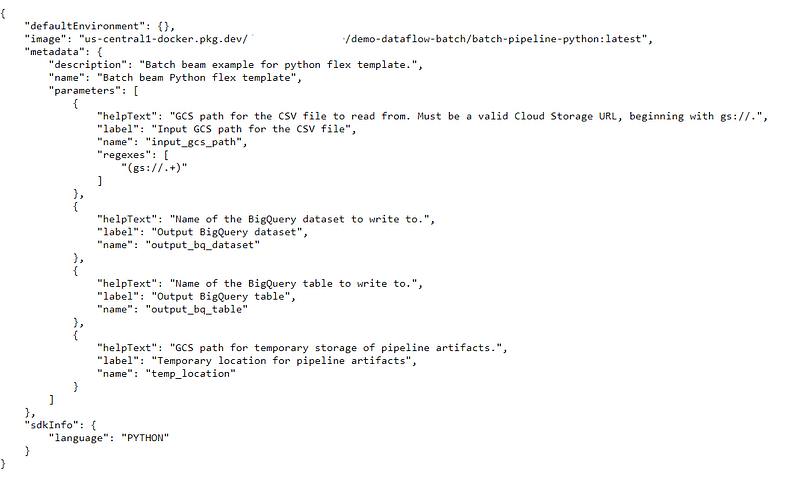
มาเริ่มเขียน metadata.json กันโดยเป็น file ที่จะบอกว่าจะต้องใส่ Parameter อะไรบ้างเวลาที่เลือกใช้งาน Template โดย Default ทาง Dataflow จะมี runner, location และ job name เพราะงั้นเราไม่ต้องใส่ลงไปใน metadata ในที่ผมเขียนจะมีแค่ input output และ temp bucket เท่านั้น และที่สำคัญเราสามารถใส่ regexes ได้ด้วยเพื่อป้องกันการใส่ค่าผิด
{
  "name": "Batch beam Python flex template",
  "description": "Batch beam example for python flex template.",
  "parameters": [
    {
      "name": "input_gcs_path",
      "label": "Input GCS path for the CSV file",
      "helpText": "GCS path for the CSV file to read from. Must be a valid Cloud Storage URL, beginning with gs://.",
      "regexes": [
          "(gs:\/\/.+)"
        ]
    },
    {
      "name": "output_bq_dataset",
      "label": "Output BigQuery dataset",
      "helpText": "Name of the BigQuery dataset to write to."
    },
    {
      "name": "output_bq_table",
      "label": "Output BigQuery table",
      "helpText": "Name of the BigQuery table to write to."
    },
    {
      "name": "temp_location",
      "label": "Temporary location for pipeline artifacts",
      "helpText": "GCS path for temporary storage of pipeline artifacts."
    }
  ]
}
metadata.json พร้อมแล้วก็มาเริ่มกันเราจะมีไฟล์ทั้งหมดตามนี้ (ไม่รวม readme.md) requirements.txt ควรสร้างเอาไว้หากเรามี Library ที่มีความจำเป็นเฉพาะแล้ว Built in ทาง Dataflow ไม่มีให้

ต่อจากนี้จะเป็น command ในการสร้าง Artifact registry และ Template โดย {} จะเป็นค่าที่ทางผู้อ่านต้องเขียนเอง
## ก่อนเริ่มให้ย้าย directory ไปอยู่ที่เราได้สร้างไฟล์เอาไว้
# สร้าง Artifact registry
gcloud artifacts repositories create {your-repo} \
 --repository-format=docker \
 --location={location}

# สร้าง Template โดย ระบบจะ build image ไปเก็บที่ artifact แล้วก็สร้าง Template file ไว้ที่ GCS bucket
gcloud dataflow flex-template build gs://{your-bucket-name}/batch-pipeline.json \
 --image-gcr-path "{location}-docker.pkg.dev/{projectid}/{your-repo}/{your-image-name}:latest" \
 --sdk-language "PYTHON" \
 --flex-template-base-image "PYTHON3" \
 --metadata-file "metadata.json" \
 --py-path "." \
 --env "FLEX_TEMPLATE_PYTHON_PY_FILE=main.py" \
 --env "FLEX_TEMPLATE_PYTHON_REQUIREMENTS_FILE=requirements.txt"
เมื่อไปดูที่ file template ใน Bucket ที่เราได้สร้าง จะเป็นการบอกว่าระบบว่า image อยู่ที่ไหนและ Parameter มีอะไรบ้าง
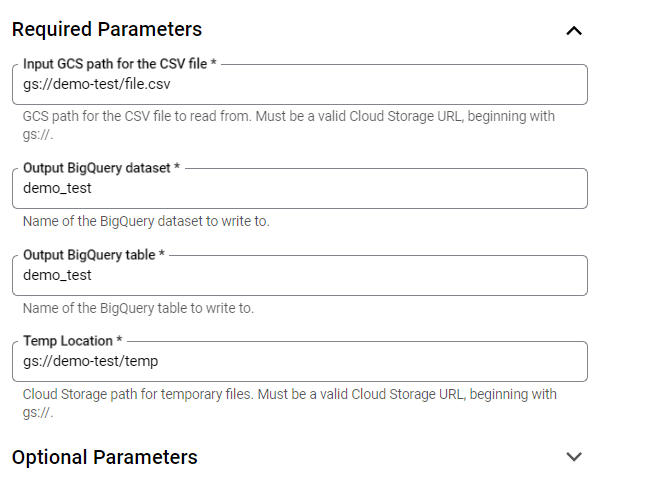
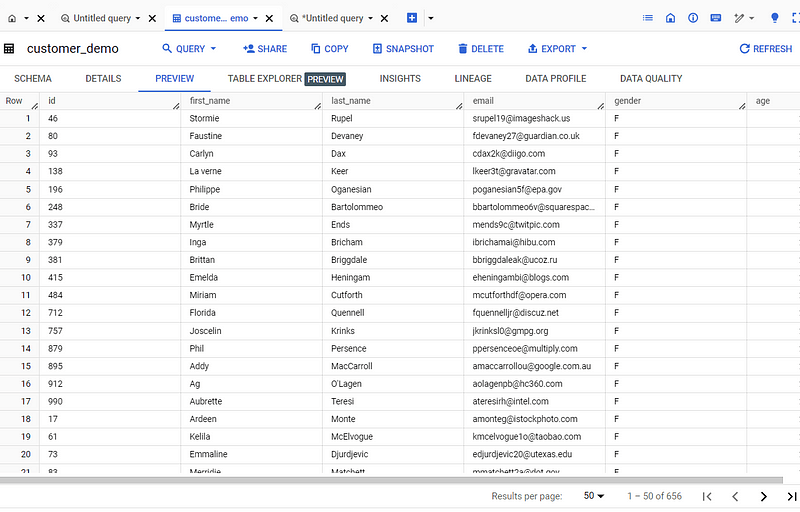
มาเช็คกันที่ Dataflow ว่าทำงานได้ไหมโดยไปที่ Cloud dataflow แล้วเลือก custom template เลือกไปที่ template ของเราแล้วก็ใส่ค่าต่างๆพร้อมแล้วก็กด run!!

3. Apache Beam VS. Apache Spark
Apache Beam และ Apache Spark เป็นสองเฟรมเวิร์กสำหรับการประมวลผลข้อมูลขนาดใหญ่ (Big Data) แต่มีจุดแข็งและจุดอ่อนที่แตกต่างกันไป การเลือกใช้เฟรมเวิร์กใดจะขึ้นอยู่กับความต้องการและข้อจำกัดของงานๆนั้น
ความแตกต่างที่จะเห็นได้ชัดคือ Apache Beam จะมีความยืดหยุนสูง สามารถเอาไปทำงานที่ engine ได้หลากหลายแบบ เช่น GCP dataflow, spark or flink และยังเป็นเฟรมเวิร์กที่สามารถเขียนครั้งเดียวและแก้ไขเพียงเล็กน้อยก็สามารถสลับไปมาระหว่าง streaming และ batch ได้เลย
ข้อดีของ Apache Spark ข้อดีหลักๆเลย Community ที่ใหญ่มากทำให้มี use case และข้อมูลต่างในการทำงานเยอะและยังเป็น data processing ที่เห็นได้ในCloudเจ้าต่างๆ และการ process ข้อมูลมีความเร็วที่สูงมากเนื่องจากทำงานแบบ in-memory
ความคิดเห็นส่วนถ้าทำงานโดยใช้ Google Cloud อยู่แล้วการเรียนรู้เรื่อง Apache Beam เหมาะนั้นสมอย่างยิ่งและยิ่งถ้าเป็นงานที่ต้องทำในรูปแบบ streaming แล้ว Dataflow จะหนีไปไหนละ แต่ถ้าไม่ได้หวังพึ่งพิงการใช้ serverless ของ GCP แล้วละก็ไป Spark ดีกว่า 😅

REF:
This article repo: https://github.com/kriangsak-puk/dataflow_flex_demo
Beam programing official doc: https://beam.apache.org/documentation/
Bigquery plugin doc: https://beam.apache.org/releases/pydoc/2.15.0/apache_beam.io.gcp.bigquery.html#apache_beam.io.gcp.bigquery.WriteToBigQuery
GCP how to build template: https://cloud.google.com/dataflow/docs/guides/templates/using-flex-templates
Follow me here!
Medium: https://medium.com/@puk.kriangsak
linkedin: https://www.linkedin.com/in/kriangsak-sumthong/
FB page: https://www.facebook.com/profile.php?id=61563097228247
 Clouddatalabor
Leave a comment